

Education
How to Digitize School Administration Without Internet Dependency
Move from registers and spreadsheets to structured digital records—while keeping daily work on your campus server, not in the cloud.
15 Jun, 2026
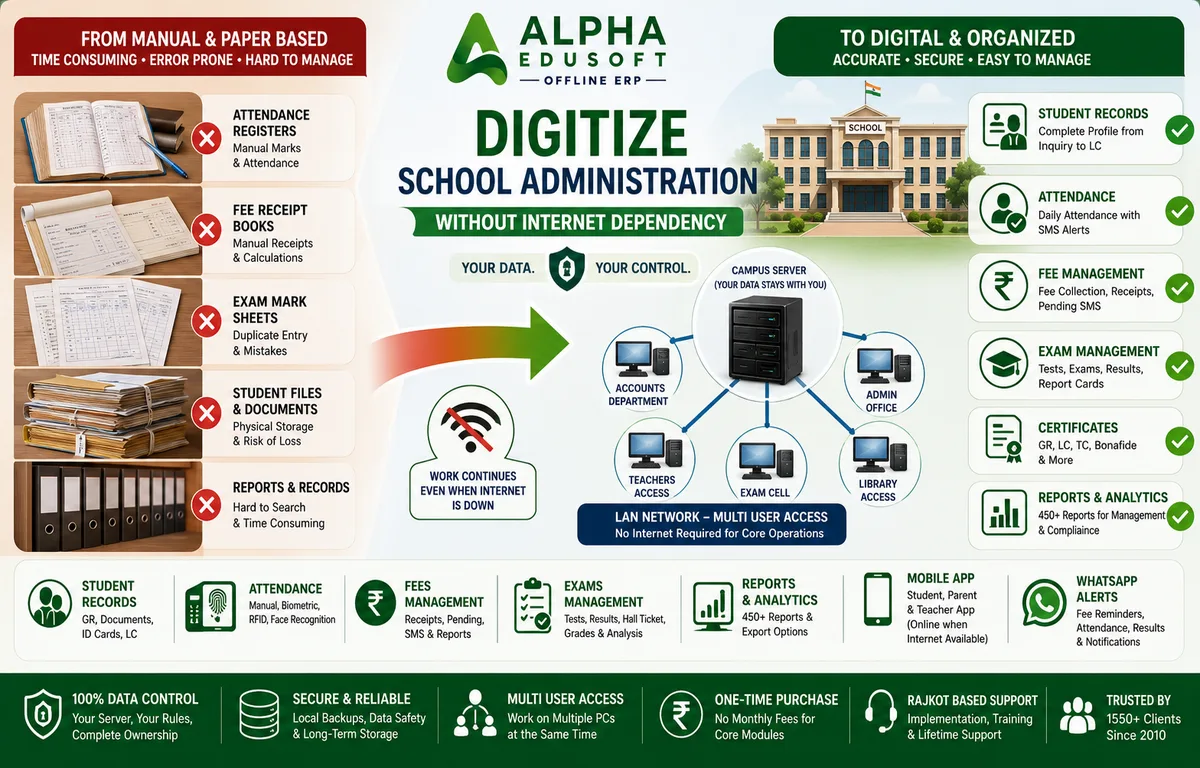
Management committees across India talk about school digital transformation every year. The conversation usually ends at broadband bills, cloud subscriptions, and the fear that one router failure will stop the fee counter. That fear is fair—but it points to the wrong conclusion. You can digitize school administration without making the internet a daily requirement. The right offline school management software runs on a campus server and local network, so attendance, fees, exams, reports, and student records stay accurate even when connectivity drops. This guide walks through what that looks like in practice, and where Alpha Edusoft Offline ERP fits schools that want modern administration without cloud dependency.
What digitizing school administration actually means
Digitization is not scanning old GR books and calling it done. It means every daily task—marking attendance, issuing a fee receipt, entering unit test marks, printing a report for the principal—happens in one school administration software database instead of five separate notebooks. Staff stop retyping the same student name into Excel, WhatsApp lists, and receipt books. Parents get consistent SMS or app updates because the source data is live on campus, not copied by hand at 6 p.m.
- Single student profile from inquiry through leaving certificate
- Linked fee, attendance, and exam history per roll number
- Printable reports for management, auditors, and board filings
- Role-based access so accounts, teachers, and principals see only their screens
- Backups you control on your own MS SQL server
Why many schools delay going digital
Registers feel safe because they never show a login error. Cloud demos look polished until someone asks what happens during a power cut on fee day. Committees also worry about training clerks who have used paper for twenty years, and about data leaving the campus. These are practical concerns—not resistance to progress. The answer for many Indian institutes is offline school ERP: digital workflows on a LAN, with optional SMS and WhatsApp when the internet is available, not mandatory for core work.
Digitizing attendance without daily internet
From class registers to parent alerts
Paper attendance works until a parent disputes absence three weeks later and the register page is smudged. When you digitize school administration for attendance, teachers or biometric devices mark present, absent, late, or leave in the ERP. The record ties to the same student ID used for fees and exams. Absent and late-arrival SMS can go out the same day—queued on your server and sent when connectivity allows, while the register itself is already saved locally.
- Manual entry by class teacher on LAN workstations
- Fingerprint, RFID, or face devices feeding the daily register
- Staff attendance with monthly registers for HR
- Hostel attendance for residential campuses
- Reports for class-wise, monthly, and session summaries
Why offline attendance beats cloud-only tools
Morning rush does not wait for SaaS login pages. With offline school management software, multiple PCs update registers at once. If broadband fails at 8 a.m., marks are still captured; only the optional SMS batch waits.
Digitizing fee collection and accounts
Receipts, pending lists, and INR fee heads
Fee season is where manual systems hurt most. Tuition, transport, hostel, admission, and late fees sit in different notebooks; accounts spends evenings reconciling totals. School administration software centralises fee heads in INR, prints numbered receipts from the counter, and shows pending balances on a dashboard. Adjustments and concessions stay logged against the student profile so disputes have a clear trail.
- Fee dashboard with class-wise and head-wise pending views
- Receipt printing from multiple LAN PCs at the same time
- Pending fee SMS for systematic follow-up
- Expense ledger, inventory, and PDC where your accounts team needs them
- Export to Excel or PDF for trust meetings and audits
Fee counters that survive connectivity gaps
Cloud fee modules that need always-on internet create queues on fee day. Offline school ERP keeps collection and receipt numbering on your campus server. WhatsApp and SMS use the internet when it is there—they are add-ons, not the foundation.
Digitizing exams, marks, and report cards
One marks database from class test to board result
Exam digitization means teachers enter marks once, principals apply grace rules, and report cards print from approved data—not from a fresh Excel merge the night before results day. For CBSE schools, that includes report card layouts, grade systems, rank lists, and hall tickets. GSEB institutes need round test flows, state board result patterns, and analysis that highlights weak students before finals.
- Class tests and round test systems with SMS when results are approved
- CBSE report cards and GSEB result formats from the same student master
- Hall ticket (admit card) generation linked to exam schedules
- Grade, rank, and subject-wise analysis for remedial planning
- Test reports exportable for academic meetings
Exam season without duplicate entry
When marks live only in notebooks, the exam cell retypes everything and errors follow. Offline school management software links exam data to the same student profile. Teachers enter marks on LAN; the exam desk publishes when ready—no cloud uptime required during result week.
Digitizing student records for the full lifecycle
GR, documents, ID cards, and leaving certificate
Student records are the spine of school administration software. Digitize school administration here and every other module becomes easier. Inquiry forms become GR entries. Documents attach to the profile instead of sitting in plastic folders. Auto roll numbers, ID cards, certificates, DISE details, and leaving certificates pull from one database. When a CBSE auditor or parent asks for history, staff search by name or GR number—not three cupboards.
- Inquiry management linked to admission and GR
- Document storage for birth certificates, caste certificates, and transfers
- Promotion and year-change with session history preserved
- Leave, complaints, remarks, and circulars on the student timeline
- LC generation with accurate fee and attendance summaries
Reports principals and trustees actually use
Digital transformation fails when software cannot print what management expects. Alpha Edusoft Offline ERP includes 450+ reports—fee summaries, attendance registers, exam analysis, and exports for audits. Accounts hands trustees Excel extracts that match receipt books because both come from one system.
Why schools do not need internet for daily operations
LAN-first architecture explained plainly
Daily school work—fee receipts, attendance marks, marks entry, GR updates, report printing—runs between staff PCs and your campus server over the local network. MS SQL holds the data; user rights control who opens which screen. Internet enters the picture for optional services: sending SMS, pushing WhatsApp alerts, syncing mobile apps for parents, or downloading updates from Alpha Softwares. None of those should block the fee counter when the line is down.
- Multi-user LAN access for accounts, admin, teachers, and library
- Data stored on your server—you own backups and retention
- Mobile apps read from campus data; core edits stay on LAN
- One-time purchase model without per-month cloud seats for core modules
- Rajkot-based implementation and support since 2010 for 1550+ clients
When internet still helps—and when it should not be mandatory
Parents appreciate WhatsApp fee reminders; teachers use the mobile app for homework. Those features need connectivity sometimes. But if your school administration software cannot issue a receipt or print a hall ticket without SaaS login, you have outsourced uptime you cannot control.
How Alpha Edusoft Offline ERP supports your digitization plan
Alpha Edusoft is built for Indian K-12 schools and colleges that want structured digital records without betting daily operations on broadband. Modules cover student management, fees, attendance, exams, library, hostel, reports, mobile apps, and WhatsApp—on an offline core. Alpha Softwares from Rajkot trains staff on familiar workflows and migrates spreadsheet data for the active session plus audit history you need.
- Campus server with LAN multi-PC access
- CBSE and GSEB exam formats included
- Biometric and RFID attendance where configured
- Parent and teacher mobile apps with OTP security
- Backup alerts and year-change for session handovers
A sensible order to digitize your campus
Most institutes phase the rollout: student GR and fees first, then attendance and SMS, then exams and report cards, then library or hostel as needed. Each step uses the same student ID, so later modules never restart from paper.
Conclusion
Digitizing school administration does not require betting your fee counter on cloud uptime. With offline school ERP on your campus LAN, attendance, fees, exams, reports, and student records become structured and consistent—while SMS and apps use the internet when available. Alpha Edusoft Offline ERP has supported Indian institutes since 2010 with that balance.
Explore all modules, pricing in INR, or request a demo with our Rajkot team.
Ready to simplify your institute management?
Discover how Alpha Edusoft Offline ERP can simplify attendance, fees, examinations, communication, and daily administration—without internet dependency.
Since
2010
Clients
1550+
Support
Rajkot
Frequently Asked Questions
Can we digitize school administration without stable broadband?
Yes. Core work—fee receipts, attendance, marks entry, GR updates, and report printing—runs on your campus LAN without daily internet. SMS, WhatsApp, and mobile apps use connectivity when available but do not block the fee counter when the line is down.
What happens to our data if the internet is down for weeks?
Student, fee, exam, and attendance data stays on your MS SQL server on campus. Staff continue working across LAN PCs. Only optional outbound alerts queue until connectivity returns. You control backups locally rather than depending on a vendor cloud.
Is offline school ERP only for large schools?
No. Small and mid-size institutes often gain the most because one clerk handles fees, GR, and exams—duplicate manual work hurts them first. Alpha Edusoft scales from single-branch schools to multi-campus trusts with the same offline core.